Module Bundle Optimization in NextJS
Module bundle optimization using various methods including Next bundle analyzer, React lazy, dynamic import, lightweight library variants, and separate module imports.

What is Module Bundler?
Using JavaScript files directly imported in HTML for feature implementation allows control over script loading timing through options like defer and async, or by changing script positions to control when they load. However, this approach is far from module optimization. This creates problems where all unnecessary parts of modules must go through transmission/download processes, resulting in increased First Contentful Paint (FCP) times, which serve as user experience metrics.
Module bundlers represented by webpack and vite solve this problem through several methods:
1. Dependency Graph Construction
Check all import statements to create a dependency map.
2. Tree Shaking & Dead Code Elimination
Remove all unused exports from modules based on the generated dependency map.
3. Code Splitting & Chunking
Divide the tree-shaken code to generate scripts, which are loaded in HTML and organized into chunks.
- Main chunks: Framework code + essential components
- Route chunks: Page-specific code
- Vendor chunks: Third-party libraries
- Dynamic chunks: Lazy-loaded components
4. Bundle Generation
The JavaScript files processed through the above steps undergo the following treatments to generate the final bundle:
- Minification: Remove unnecessary whitespace, comments, and shorten variable names
- Source Mapping: For debugging purpose
- Asset Fingerprinting: Asset indexing to enable caching
The process of generating the minimum script files necessary for service delivery is called bundling. While bundling provides significant optimization, there are aspects to understand and additional work required to see definitive results.
Bundle Analyzer
Module bundles generated by bundlers are difficult to directly examine due to minification and other optimization processes. Therefore, each bundler provides development support tools for bundle visualization(webpack-bundle-analyzer, vite-bundle-visualizer).
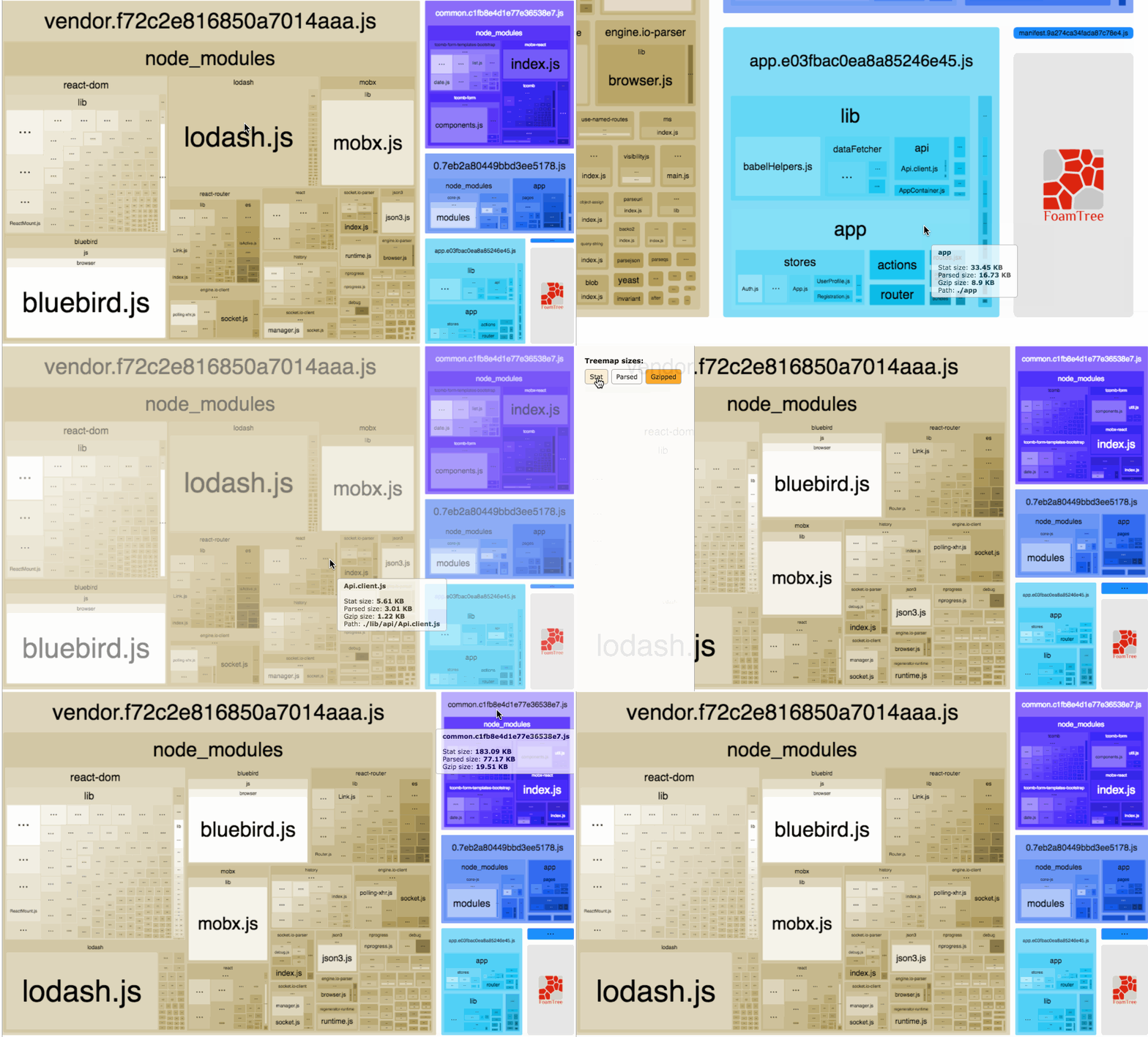
Bundle Analyzer Example
You can examine the composition and size of generated bundles as shown above.
Next Bundle Analyzer
The @next/bundle-analyzer used in this project can be added without major configuration changes.
cross-env is a package that helps specify environment variables regardless of OS.
As configured above, bundle analyzer inclusion is determined by the flag environment variable value. Without this condition, bundle analyzer would run every time you build.
Finally, by adding scripts to package.json that run according to the set conditions, you can create a process that includes bundle analyzer only when you want to examine bundles selectively.
When you run the specified script, three files are generated under the .next/analyze/ directory.
- nodejs: Bundles of server-side Node.js runtime
- client: Client-side bundles for browsers
- edge: Bundles of edge runtime
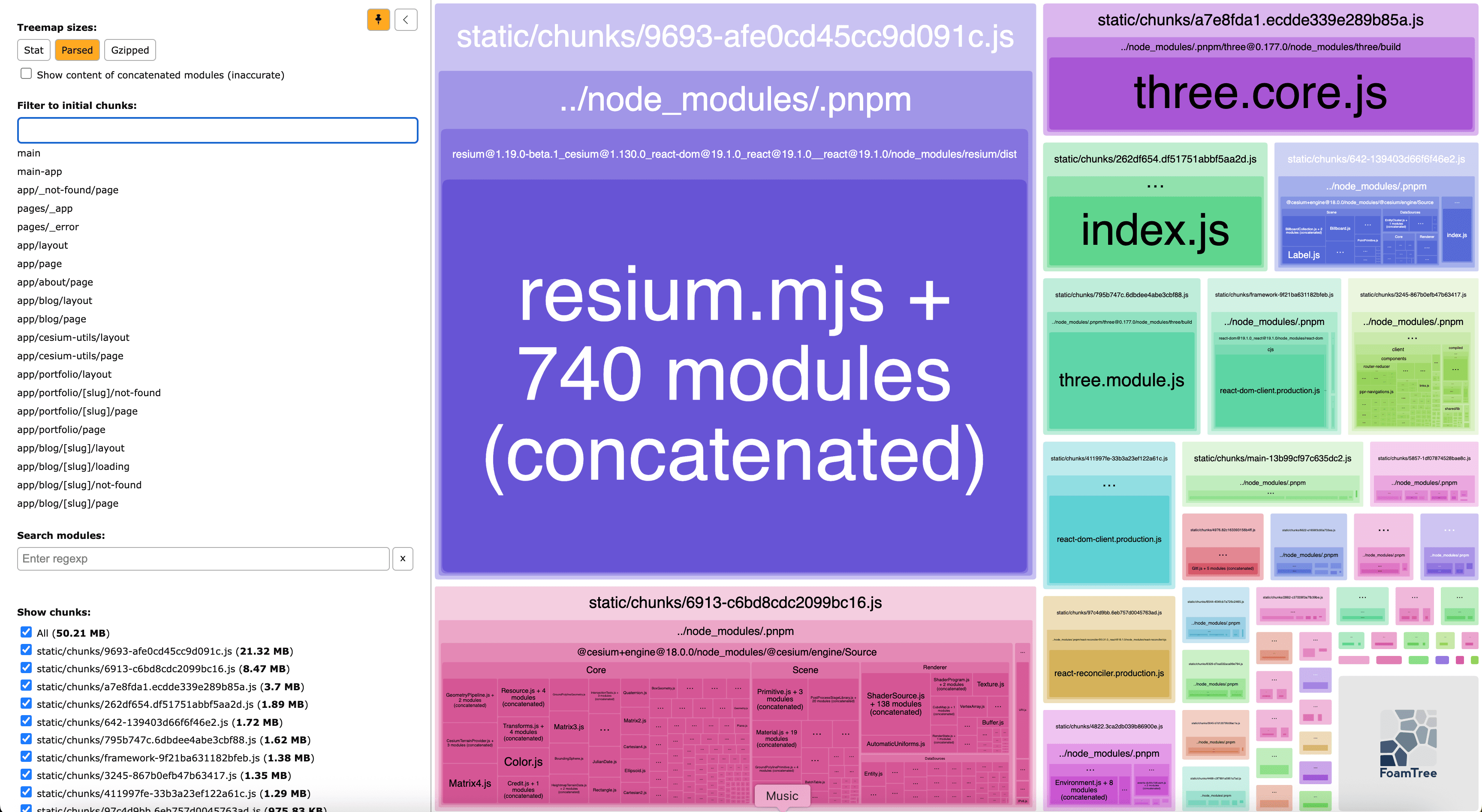
@next/bundle-analyzer result: client.html
client.html allows you to examine client-side code bundles divided by page routes.
Optimization Methods
Module bundlers reduce script size on their own as mentioned earlier, but scripts can still be large or unnecessary scripts may remain. This web project hosting this article also serves web 3D demos (Cesium Utils, Three.js), causing users who don't visit those pages to download related code bundles. There are three main methods to solve such additional problems.
1. React.lazy & Dynamic Import
The first method includes React.lazy and Dynamic Import. React.lazy is a React API used with Suspense that delays execution of parameter code until component loading. Dynamic Import is syntax that allows asynchronous and dynamic module loading, unlike import statements declared at the top of files.
Dynamic imports allow one to circumvent the syntactic rigidity of import declarations and load a module conditionally or on demand. - mdn web docs
As you can infer from the description, the combination of these two results in delaying module import until component loading. You can delay loading of modules included in specific components.
The above shows a simplified viewer component using cesium and resium. These two have considerable individual module bundle sizes, and importing them in static pages (Next.js standard) means downloading all modules regardless of which page you view.
Here, we create an entry point called index.tsx and lazy import the viewer component. Cesium and resium modules are only loaded when the viewer component loads. import type is not included in runtime code, so you don't need to worry about it.
Note: To separate specific modules, there must be no direct imports in all static pages. This means all components using that module must be made into lazy import format.
2. Barrel Exports
Next is barrel exports, briefly mentioned above inside a code example. First, barrel exports refers to collecting exports scattered across multiple files into an entry point named index for unified management. Using barrel exports can improve code readability, but can be fatal in terms of bundle size. Bundles are generated including all modules imported from entry points.
For example, even if you only import and use Button from the above entry point, the bundle is generated including Button, CodeBlock, Popover, etc.
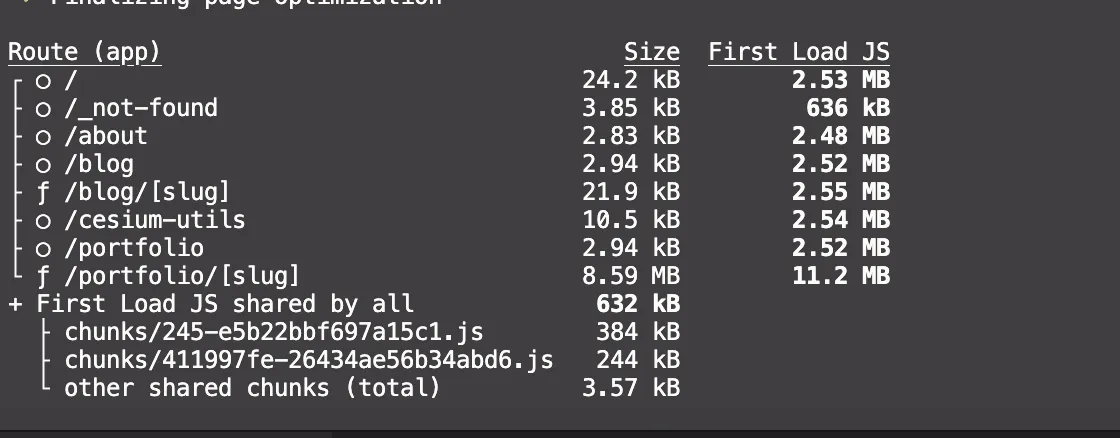
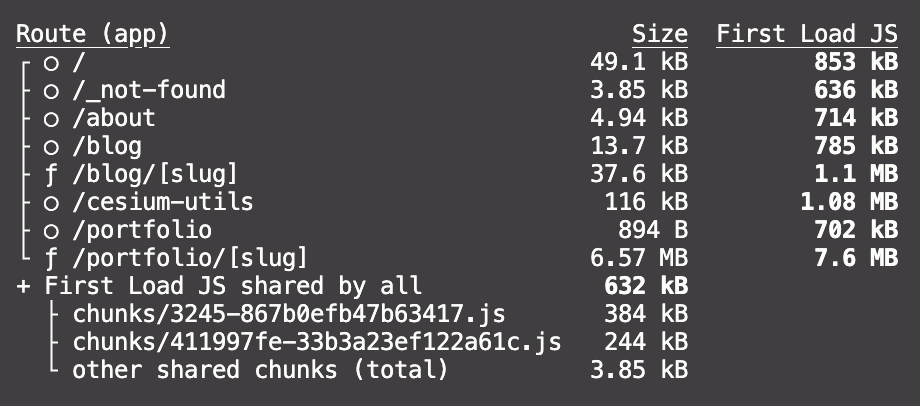
This project separates basic UI components into a monorepo structure, and organizing all components with barrel exports resulted in all pages' First Load JS capacity exceeding 2MB. Actually importing components individually without going through the entry point confirmed that the homepage (/) First Load JS size decreased from 2.53MB → 853kB, a 66% reduction.
3. Using Lightweight Library Variants
Among the project's UI components, react-syntax-highlighter used in CodeBlock supports over 200 programming languages and occupied a large portion of First Load JS. This project uses only about 10 languages, so including all those languages is unnecessary. Fortunately, this library provides a Light module without included languages along with languages in variants format, allowing direct registration of needed languages.
Applying lightweight library variants by selecting only needed languages resulted in First Load JS size for pages using CodeBlock decreasing from 1.82MB → 1.1MB, about 40% reduction. Libraries providing lightweight versions of modules can significantly reduce bundle size depending on their utilization.
Results
The results obtained in this project through the listed methods are as follows:
Next build result: before and after the optimization
| Route | Before | After | Reduction |
|---|---|---|---|
| home | 2.53MB | 853kB | 66% |
| blog posts | 2.55MB | 1.1MB | 57% |
| about, portfolio | ~ 2.5MB | ~ 700kB | 72% |
Total Impact Summary of Bundle Optimization
You can confirm that First Load JS size decreased significantly across all routes.
cf. Modular Exports
Module bundle optimization is certainly influenced by project-level optimization techniques, but equally important is whether packages used consider optimization. When publishing packages to npm, or directly managing modules in package format through monorepo structures as in this case, what you must keep in mind is modular export. Modular export refers to providing entry points that bundle package functionality by feature units, allowing package users to import and use only needed functionality.
@juun-roh/cesium-utils package.json: exports
You can achieve modular export by creating entry points that import only modules needed for functionality and specifically specifying exports paths in package.json structure.
Closing
The journey that started to confirm whether lazy import changes to Cesium components would actually be effective took longer than expected. Since I started checking First Load JS size with bundle analysis tools after already introducing lazy import in this project, I couldn't experience its impact firsthand. However, the cautionary points about using barrel exports and the significant impact of using lightweight versions of libraries on bundle size provided important perspectives for UX-focused optimization.
Publishing the @juun-roh/cesium-utils package also made me realize the importance of modular exports, which I had simply followed recommendations for previously, making it meaningful work.